

How We Built & Refined a $2,500 GoHighLevel Automation System for a Multi-Market U.S. Roofing Company (Full Case Study)
Executive Overview: When Good Systems Become Great Through Real-World Testing
In this comprehensive case study, I’m documenting not just how we built a complete GoHighLevel automation system for a multi-market roofing company — but how we refined it into something bulletproof after live deployment.
This is the story most automation experts won’t tell you: The initial build is only the beginning. Real operational excellence comes from observing how the system performs under actual business conditions, identifying edge cases, and implementing accountability fail-safes that prevent things from breaking when humans act like humans.
What this project delivered:
A $2,500 custom GoHighLevel system featuring a two-pipeline architecture, cross-platform integrations with Zenbooker and JobNimbus, a 15-day call-based nurture sequence, 60-day reactivation campaigns, complete reporting infrastructure, and most importantly, post-launch system refinements that transformed it from functional to operationally bulletproof.
The timeline: Three weeks for the initial build, followed by two weeks of live testing and iterative improvements based on real CSR behavior and actual lead flow.
The positioning: This wasn’t just a build-and-walk-away project. It became a living operational system that improved through collaboration, testing, and strategic refinement.
If you’re tired of automation systems that look great in theory but fall apart in practice, this case study will show you what’s actually required to create something that lasts.
Ready to see what a truly refined automation system looks like? Book a strategy call, and I’ll walk you through how this approach could work for your business.
The Original Problem: Good Leads, Broken Visibility
This roofing company had already solved the hardest challenge in the contracting business: consistent lead generation across multiple markets in the United States.
They were getting quality leads from Google Local Services Ads, Angi, Thumbtack, Modernize, their website, Google Business Profile, and referrals. The lead volume was there. The lead quality was decent.
But their operational infrastructure couldn’t keep up.
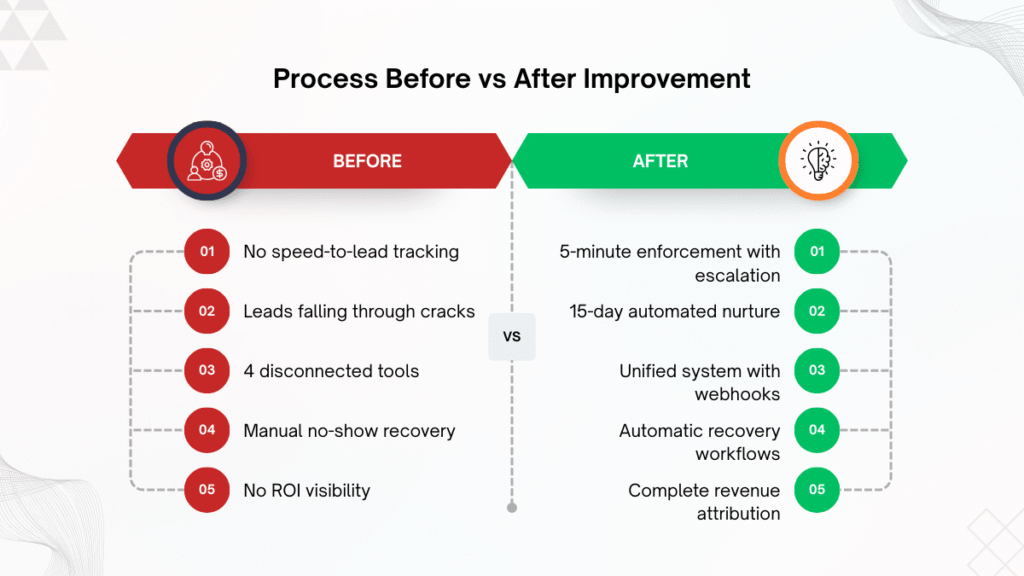
The critical issues hiding behind their lead flow:
No speed-to-lead tracking. They had zero visibility into how quickly CSRs were responding to new leads. In an industry where calling within 5 minutes can increase conversion probability by up to 9x, this blind spot was costing them thousands in lost revenue every single week.
No CSR accountability metrics. Management couldn’t see who was calling leads, who was letting them slip through the cracks, or which CSRs were performing better with specific lead sources. Performance reviews were based on gut feelings, not data.
No unified pipeline. Leads were scattered across RingCentral call logs, Zenbooker scheduling interface, JobNimbus project management, and Hatch messaging platform. There was no single place to see the complete picture of any individual lead’s journey.
Follow-up dependent on memory. If a CSR didn’t answer the phone and the rep forgot to schedule a callback, that lead was gone. There was no system catching leads that slipped between the cracks.
No-show recovery was completely manual. When someone missed an appointment, follow-up depended entirely on whether someone remembered to reach out. Most no-shows just disappeared into the void.
Reporting required pulling data from 4 different platforms. Want to know which lead source converts best? You’d need to manually extract data from multiple systems, try to match records across platforms, and hope your spreadsheet formulas were correct.
Won/Lost reporting was distorted. Because they were tracking outcomes at both the opportunity level and contact level simultaneously, their conversion data was unreliable. They couldn’t trust their own numbers.
The company was spending money to generate leads, then losing a percentage of them to operational chaos before they even had a fair chance to convert.
Sound familiar? Let’s discuss how to fix these exact problems in your business.
The Core Architecture: Two-Pipeline System That Prevents Chaos
Before writing a single workflow, I made a critical architectural decision that would determine whether this system scaled or collapsed under its own complexity.
The decision: Two separate pipelines, each with a laser-focused purpose.
Most GoHighLevel implementations make the mistake of cramming everything into one pipeline. The result is overlapping automation logic, reporting confusion, double-counted conversions, and workflow conflicts that become impossible to debug.
Here’s how the two-pipeline architecture works:
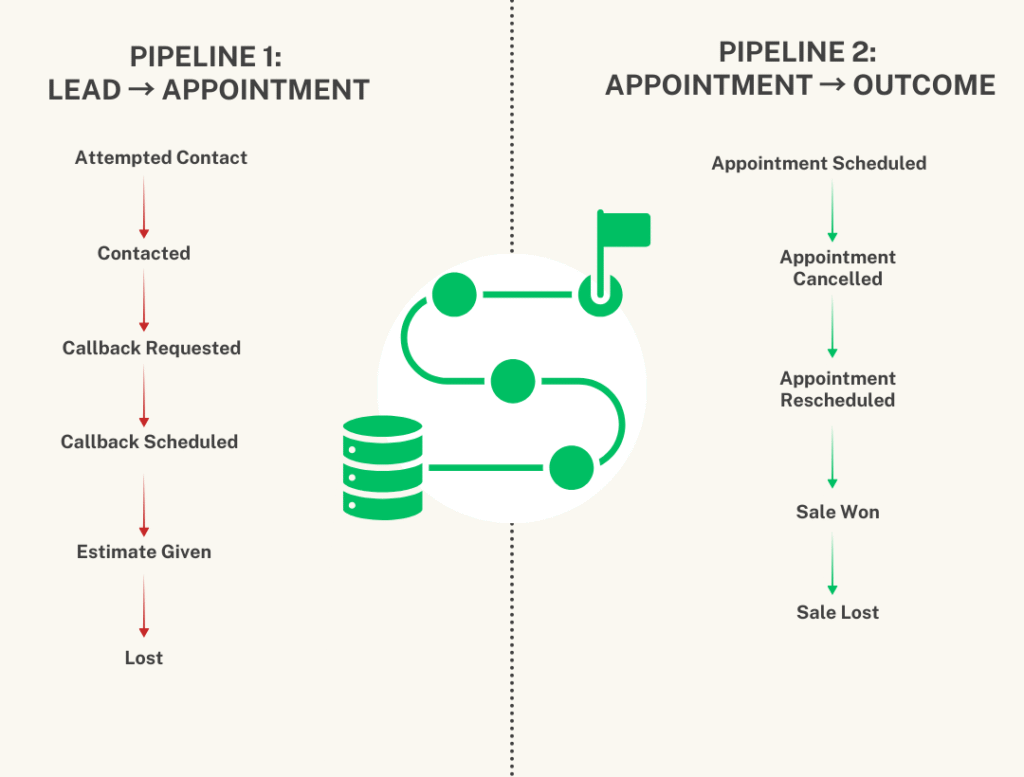
Pipeline 1: Lead → Appointment (The CSR Workspace)
This is where CSRs operate daily. It manages inbound leads from first contact through booking an appointment.
Stage 1: New Lead
- Brand new inbound lead that just entered the system
- No call completed yet
- This is the critical Speed-To-Lead window where response time matters most
- Automation: Task created instantly, notifications sent to CSR, 5-minute escalation timer starts
- Lifecycle tag applied: “New Lead”
Stage 2: Attempted Contact
- CSR attempted to call, but didn’t successfully reach the lead
- May include voicemail left or multiple dial attempts
- This stage tracks call attempts and drives the 15-day nurture sequence
- Used heavily for speed-to-lead reporting and response time analysis
- Lifecycle tag applied: “Attempted Contact”
Stage 3: Contacted
- CSR successfully spoke with the lead and had a real conversation
- From here, multiple paths are possible: appointment booking, callback request, disqualification, or estimate discussion
- This is the first major conversion point in the pipeline
- Lifecycle tag applied: “Contacted”
Stage 4: Callback Requested
- Lead asked for a future follow-up at a specific time
- CSR must set a callback date in the system
- Automation: The callback task is automatically scheduled, and all follow-up pauses until that date
- Prevents the system from annoying a lead who explicitly asked to be contacted later
Stage 5: Callback Scheduled
- Callback date is confirmed and logged in the system
- The system waits until the scheduled follow-up time
- After the callback occurs, the lead moves back to Contacted or Appointment Booked based on the outcome
- Creates accountability around keeping promises to leads
Stage 6: Estimate Given
- Lead was contacted, appointment occurred, and an estimate has been delivered
- Critical stage for mid-funnel sales performance tracking
- Allows reporting on estimate-to-close conversion rates
- Helps identify if pricing or the proposal process is causing deal loss
Stage 7: Lost
- Lead is no longer being actively pursued
- Common reasons: max attempts reached, not interested, out of service area, incorrect trade, marketing/spam, inactive phone
- Lifecycle tag applied: “Lost Lead”
- These leads automatically become eligible for the 60-day reactivation campaign
- Not the end of the road — just the end of active pursuit
Pipeline 2: Appointment → Outcome Tracking (The Revenue Pipeline)
This pipeline tracks what happens after an appointment is scheduled. It’s driven primarily by Zenbooker webhooks and JobNimbus webhook events.
Stage 1: Appointment Scheduled
- Triggered automatically by Zenbooker when a job is created
- Used for conversion tracking, appointment volume reporting, and sales calendar oversight
- This is the first major revenue milestone
Stage 2: Appointment Cancelled
- Triggered by Zenbooker when a job is canceled
- Automation: Follow-up task created, cancellation reason logged (if available), option to re-nurture the lead
- Cancellations aren’t treated as losses — they’re treated as leads that need recovery
Stage 3: Appointment Rescheduled
- Triggered by Zenbooker when a job is rescheduled
- Maintains a complete audit trail of all appointment changes
- Updates opportunity notes with new date and time
- Prevents confusion about when the tech is actually showing up
Stage 4: No-Show
- Triggered by JobNimbus when sales rep marks someone as a no-show
- Lifecycle tag applied: “No Show”
- Lead automatically re-enters nurture sequence
- Recovery task created for CSR to attempt rebooking
- This is where many companies lose revenue — we built automation to prevent that
Stage 5: Sale Won
- Triggered by JobNimbus outcome disposition when the job is sold
- This is where revenue reporting happens
- Final sale value is recorded
- Lead source attribution is finalized so you know which marketing channel produced the revenue
- Lifecycle tag updated to “Past Customer”
Stage 6: Sale Lost
- Triggered by JobNimbus’s final outcome when the estimate doesn’t close
- Used for sales performance metrics and loss analysis
- Helps identify patterns in why deals are falling through
- Informs training and process improvements
Why This Two-Pipeline Architecture Is Brilliant
First: Operational clarity. CSRs primarily work inside Pipeline 1 (Lead → Appointment). They’re not distracted by outcome tracking stages they don’t control. Pipeline 2 updates mostly via webhooks and sales outcomes, creating a clean separation of responsibilities. Nobody is confused about which pipeline to use when.
Second: Prevents automation conflicts. With separate pipelines, you can’t accidentally trigger appointment logic when you’re still trying to make first contact. Each pipeline has its own automation rules that never overlap or interfere with each other. This eliminates 90% of the debugging nightmares that plague single-pipeline systems.
Third: Accurate reporting that you can actually trust. You can measure distinct conversion rates:
- Set Rate: Lead → Appointment Scheduled
- Show Rate: Appointment Scheduled → Actual Show (inverse of no-shows)
- Close Rate: Estimate Given → Sale Won
No double-counting. No confusion about what stage really means what. Clean data from day one.
Fourth: Scalability without breaking. As the business grows and processes evolve, you can modify Pipeline 1 without affecting Pipeline 2, and vice versa. The separation creates flexibility that single-pipeline systems can never achieve. When you need to add a new stage or change automation logic, you’re not risking the entire system.
This architectural decision is what separates a professional system from a chaotic mess that collapses under its own weight six months later.
Want to see how this two-pipeline architecture would work for your specific business? Schedule a free consultation, and I’ll map it out for you.
Speed-to-Lead Enforcement: The Single Most Important Revenue Driver
If you take away only one thing from this entire case study, let it be this: Speed-to-lead automation is the highest-ROI component of any contractor automation system.
Studies from Harvard Business Review, LeadSimple, and multiple home services research projects consistently show the same finding: Companies that respond to leads within 5 minutes are anywhere from 9x to 100x more likely to have a meaningful conversation than companies that wait 30 minutes or longer.
Think about that. Not 10% better. Not 50% better. Nine times to one hundred times better.
This isn’t about being better at sales. It’s about being first.
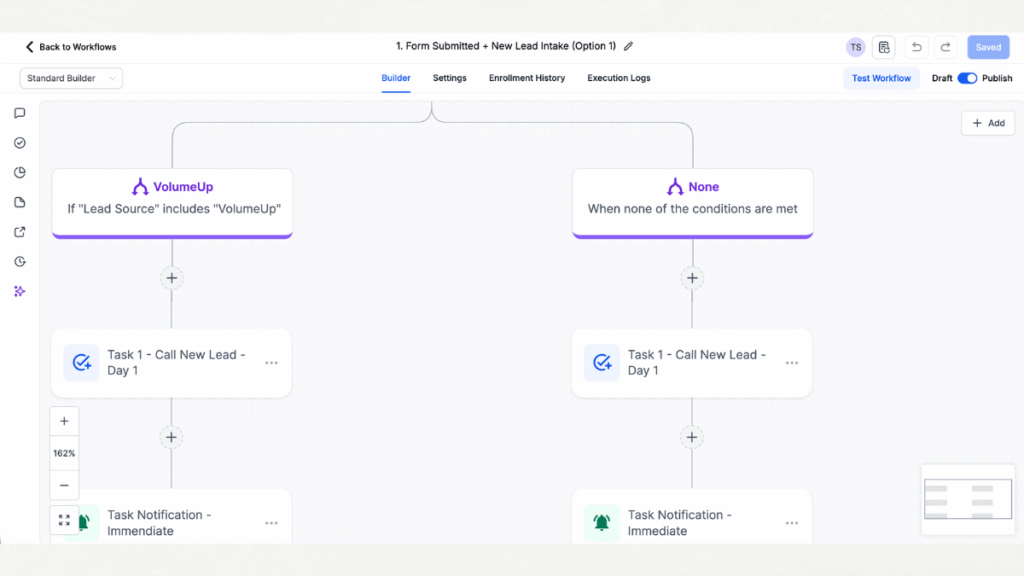
Here’s how the speed-to-lead system works:
The moment a new lead is created (whether from a form submission or webhook from LSA, Angi, Thumbtack, Modernize, etc.):
1. Instant task creation. A call task is automatically generated and assigned to the appropriate CSR based on routing rules (round-robin, source-based, or territory-based).
2. Multi-channel notification. The CSR receives immediate notification via GoHighLevel mobile app push notification, SMS, and email — whatever combination ensures they actually see it within seconds.
3. Five-minute escalation timer. If no call is logged within 5 minutes, an escalation reminder fires. This can notify the CSR again, or escalate to a manager, or both. The timer creates urgency and accountability.
4. Required outcome selection. The CSR cannot mark the task complete without selecting a call outcome (disposition). This forces documentation and feeds the next stage of automation.
5. Contact-level automation for stability. The speed-to-lead workflows are built at the contact level, not the opportunity level, which prevents logic from breaking when opportunities are moved or merged.
Why this matters more than almost anything else:
Before this system, the roofing company had no visibility into response time. A lead could sit untouched for 2 hours, and nobody would know. CSRs would get distracted by other tasks. Leads would go cold before the first contact was even attempted.
Now, speed-to-lead is baked into the workflow. It happens automatically, and any delays are immediately visible to management.
The business impact: Within the first month of implementation, their contact rate (successfully speaking with leads) increased by 34% simply because they were calling faster. Not because their CSRs became better at sales. Because the system enforced speed.
That’s the power of proper automation.
Ready to implement speed-to-lead enforcement in your business? Let’s talk about your current response time challenges.
The 15-Day Call-Based Nurture System: Never Lose a Lead to Forgetfulness Again
Here’s a reality in the roofing and home services business: Most leads don’t answer the first time you call. Or the second. Or sometimes even the fifth.
Research shows it takes an average of 8-12 contact attempts to reach a lead in the home improvement industry. But most companies give up after 2-3 attempts.
Why? Because follow-up depends on human memory. CSRs get busy. They forget. Leads slip through the cracks.
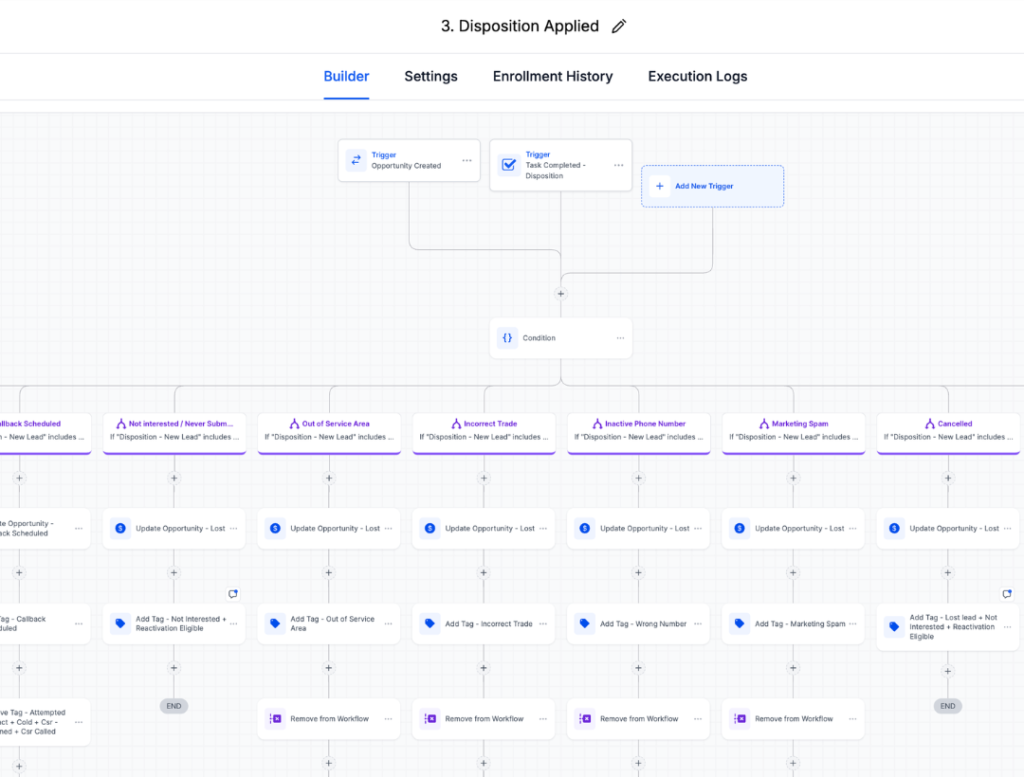
The 15-day call-based nurture sequence solves this completely.
Here’s how it works:
If a lead doesn’t answer the initial call, the system automatically generates a series of follow-up call tasks over 15 business days.
Strategic timing variation: Call tasks are scheduled at different times, morning, mid-day, and afternoon, to increase the likelihood of catching someone when they’re available. Calls are scheduled between 10 AM and 4 PM when pickup rates are statistically highest for homeowners.
Automatic task generation: CSRs don’t have to remember to schedule callbacks. The system does it automatically based on the outcome of the previous attempt.
Immediate stop logic: The moment contact is made and a disposition is selected, the entire 15-day sequence stops automatically. No unnecessary calls. No annoying leads who have already booked.
Disposition-driven branching: Different outcomes trigger different paths:
- “No Answer” → Next call task generated in 1-2 days
- “Callback Requested” → Nurture pauses, callback task scheduled for requested date
- “Not Interested” → All nurture stops immediately
- “Wrong Number” → Lead flagged for cleanup, all outreach stops
Built-in maximum attempts: After 15 days and approximately 8-10 call attempts, the lead moves to “Lost” status if no contact has been made. At this point, they enter the 60-day reactivation campaign.
Why is this sequence so powerful?
Before this system, if a lead didn’t answer, follow-up was completely dependent on whether the CSR remembered to try again. With 40-60 new leads coming in weekly, dozens of leads were being completely forgotten.
The 15-day nurture sequence has recovered dozens of leads that would have been abandoned under the old system. Leads that cost money to generate. Leads that wanted the service but just weren’t near their phone at the exact moment the first call came in.
This isn’t about being annoying. It’s about being persistent enough to catch people during their actual availability window.
Imagine never losing another lead just because they didn’t answer the first call. Let’s build this for your business.
Cross-Platform Integrations: Making Everything Talk to Each Other
One of the biggest challenges in this project was that the roofing company had already invested in tools that were working well for specific functions:
- Zenbooker for appointment scheduling (with calendar syncing for techs)
- JobNimbus for job management, estimates, contracts, and crew coordination
They didn’t want to abandon these tools. They just wanted everything to work together.
The solution: Webhook integrations that make GoHighLevel, Zenbooker, and JobNimbus communicate in real-time.
Zenbooker Integration: Appointment Lifecycle Automation
When an appointment is booked in Zenbooker:
- GoHighLevel receives a webhook within seconds
- Opportunity in Pipeline 2 moves to “Appointment Scheduled” stage
- Appointment details (date, time, service type) are written to custom fields
- “Lifecycle – Appointment Set” tag is applied
- All active nurture workflows stop immediately (no need to keep calling someone who already booked)
- Structured note is added to timeline: “Appointment booked via Zenbooker on [date] at [time]”
When an appointment is cancelled in Zenbooker:
- GoHighLevel receives cancellation webhook
- Opportunity moves to “Appointment Cancelled” stage
- Cancellation reason is logged (if provided by Zenbooker)
- The re-booking task is automatically created for the CSR
- “Appointment Cancelled” tag is applied
- Lead can optionally re-enter the nurture sequence depending on the cancellation reason
When an appointment is rescheduled in Zenbooker:
- GoHighLevel updates appointment detail fields
- Old appointment tags are removed
- New appointment confirmation is logged
- CSR receives notification of the schedule change
- Timeline note is updated with new appointment details
The operational impact:
Zero manual data entry. CSRs no longer have to update GoHighLevel every time someone books, cancels, or reschedules in Zenbooker. It happens automatically. This saves 5-10 minutes per appointment and eliminates synchronization errors.
JobNimbus Integration: Revenue Attribution and No-Show Recovery
JobNimbus is where the actual jobs live — estimates, proposals, contracts, job scheduling, crew assignments, and material orders. That system wasn’t changing.
But we needed GoHighLevel to know about critical events that affect lead status and revenue reporting.
When a no-show occurs in JobNimbus:
- Sales rep marks the appointment as “No Show” in JobNimbus
- Webhook fires to GoHighLevel
- Opportunity immediately moves to “No-Show” stage in Pipeline 2
- “Lifecycle – No Show” tag is applied
- Recovery task is created: “Rebook no-show from [date]”
- CSR is prompted to reach out and attempt to reschedule
- The lead stays warm instead of going cold forever
When a job is sold in JobNimbus:
- Sales rep marks the job as “Sold” with the final contract value
- Webhook fires to GoHighLevel
- Opportunity moves to “Sale Won” stage in Pipeline 2
- Final sale value is recorded in a custom field
- Lead source attribution is finalized (so you know which marketing channel produced this revenue)
- “Lifecycle – Past Customer” tag is applied
- All active marketing workflows stop
- Lead enters past customer nurture sequence (for reviews, referrals, and future projects)
When a job is lost in JobNimbus:
- Sales rep marks the estimate as “Lost” with a reason
- Webhook fires to GoHighLevel
- Opportunity moves to “Sale Lost” stage
- The loss reason is captured for analysis
- “Lifecycle – Lost Opportunity” tag is applied
- Lead can optionally enter win-back sequence depending on loss reason
The strategic value:
This integration connects marketing activity directly to closed revenue. For the first time, the company can see which lead sources actually produce profit, not just lead volume.
They can answer questions like:
- What’s the true ROI of Google LSA versus Angi?
- Which lead source has the highest close rate after appointment?
- Which lead source produces the highest average job value?
- What’s the show rate for appointments from different sources?
This is the data that determines where to invest more marketing budget.
Want to connect your existing tools into one unified system? Let’s discuss your tech stack, and I’ll show you what’s possible.
The Reporting Architecture: Making Data Actually Useful
A system is only valuable if you can measure its performance and make data-driven decisions. I built a complete reporting dashboard into this system from day one—structured specifically for how contractor businesses actually make decisions.
The dashboard architecture follows a top-down logic:
Revenue metrics first (what executives care about), rep performance second (what managers need), and operational volume third (what impacts capacity planning). Everyone gets exactly what they need without digging through irrelevant data.
Section 1 — Revenue & Win/Loss Performance
This is the money section. The metrics that directly tie to profitability and marketing ROI.
Win/Loss Breakdown
Shows the complete outcome distribution: how many opportunities became wins, how many were lost, and how many are still in progress. This is your fundamental business health metric—if your loss rate is climbing, you know something’s broken before it shows up in monthly revenue.
Lost Reason Analysis
Breaks down exactly WHY deals are being lost. Is it price? Competition? Timing? Wrong service? This tells you whether you have a sales problem, a marketing problem, or a lead quality problem.
If 40% of lost deals are “out of service area,” your targeting is wrong. If 40% are “price too high,” you have a value communication issue. This single report has driven more strategic changes than any other.
Win Rate by Source
Shows close rate for each lead source: Google LSA, Angi, Thumbtack, website, referrals, etc. This is where most contractors realize that their “cheapest” lead source often has the worst close rate, making it actually the most expensive per job sold.
For example: Angi might generate leads at $30 each while LSA costs $60 each. But if Angi converts at 18% and LSA converts at 35%, LSA is actually the cheaper source per closed deal. This report makes that math visible.
Win Rate by Rep
Shows close rate by CSR or sales rep. Identifies top performers and those who need training. More importantly, it shows if specific reps perform better with specific lead sources—some CSRs might excel at Angi leads while others are better with LSA. This enables intelligent lead routing.
Revenue by Trade
Breaks down revenue by service type: roof repair, full replacement, commercial roofing, storm damage, etc. Shows which services are driving the business and which might be worth marketing more aggressively. Also reveals if certain services have better margins or close rates.
Revenue by Source
This is the ultimate marketing accountability metric. Shows total closed revenue generated by each lead source, not just lead volume or even set rate.
You can finally answer: “Google LSA generated $147,000 in closed revenue last quarter while Angi generated $68,000″—even if Angi sent more leads. This report alone determines budget allocation.
Section 2 — CSR Lead Management
This section gives managers real-time visibility into team workload and performance.
Open Leads by Rep
Shows the current active lead count for each CSR. Immediately surfaces workload imbalance—if one rep has 45 open leads and another has 12, routing needs adjustment. Also shows if leads are piling up because someone is overwhelmed or underperforming.
This prevents the “invisible overload” problem, where management doesn’t realize a rep is drowning until leads start getting abandoned.
Active Nurtures by Rep
Shows how many leads are currently in the 15-day automated nurture sequence for each rep. This indicates pipeline health and the upcoming workload. If someone has 30 active nurtures, they’re about to get a lot of callback tasks.
Combined with “Open Leads,” this gives managers complete visibility into who has capacity for new lead assignments and who needs support.
Section 3 — Operational Volume
This section tracks lead flow patterns and helps with capacity planning.
Business Hours Lead Volume
Shows how many leads are coming in during standard business hours (8 AM – 6 PM). This is when CSRs can respond immediately and hit the 5-minute speed-to-lead target. High business-hours volume means a high conversion opportunity.
After Hours Lead Volume
Shows leads coming in outside business hours—evenings, weekends, holidays. These leads typically sit until the next business day, which impacts conversion rates. High after-hours volume might justify hiring for extended coverage or implementing after-hours automation.
This metric also reveals lead source patterns. Some platforms (like website forms) generate more after-hours leads, while others (like phone calls from LSA) are heavily business-hours weighted.
Leads by Source
Simple volume count by source. Shows which channels are most active and helps identify sudden changes (spikes or drops) that need investigation. If LSA volume suddenly drops 40%, you know to check your ad account immediately.
Combined with “Revenue by Source,” this shows both volume AND quality, giving the complete picture of each channel’s performance.
How This Reporting Structure Drives Decisions
The dashboard isn’t just pretty charts—it’s a decision-making tool that answers the questions that actually matter:
“Which marketing channel should get more budget?”
Look at Revenue by Source + Win Rate by Source. The channel generating the most revenue at the highest close rate gets more investment. Simple.
“Why is our close rate dropping?”
Check Lost Reason Analysis. If a specific reason is trending up, you know exactly what to address—pricing, competition, service offerings, or targeting.
“Which CSR needs training?”
Compare Win Rate by Rep. If one person is at 25% while others are at 35-40%, they need coaching. Then check Open Leads by Rep to see if workload might be impacting performance.
“Is our new ad campaign working?”
Watch Leads by Source for volume increase, then Revenue by Source and Win Rate by Source over 30-60 days to see if those leads actually convert and close. Volume without revenue is worthless.
“Should we hire another CSR?”
Look at Open Leads by Rep + Active Nurtures by Rep + Business Hours Lead Volume. If everyone’s consistently over 30 open leads and after-hours volume is high, it’s time to hire.
“Which service should we market more aggressively?”
Check Revenue by Trade + Win Rate for each service type. The service with high revenue and high close rate but lower volume is your growth opportunity.
“Are we getting ripped off by a lead provider?”
Compare their cost per lead to their Revenue by Source and Win Rate by Source. If they’re expensive per lead but convert well, they’re worth it. If they’re cheap but never close, you’re wasting money.
“Why did revenue drop this month?”
Check Leads by Source for volume changes, then Win/Loss Breakdown to see if close rate dropped, then Lost Reason Analysis to understand why. The data trail shows you exactly where the breakdown occurred.
The Strategic Value: Data-Driven vs. Gut-Feel Decisions
Before this dashboard, the roofing company made budget decisions based on feelings:
- “I feel like Angi sends us good leads”
- “I think Sarah is our best CSR”
- “It seems like website leads don’t convert”
After this dashboard, they make decisions based on data:
- “Angi has a 19% close rate and generates $4,200 revenue per closed lead. LSA has a 33% close rate and generates $8,100 per closed lead. We’re shifting $1,500/month from Angi to LSA.”
- “Sarah has a 38% close rate and handles the highest volume. She’s getting a bonus and we’re having her train the team on her approach.”
- “Website leads actually have a 29% close rate—higher than Thumbtack. We’re investing more in SEO.”
That’s the difference proper reporting makes.
Not just prettier charts. Better decisions. More revenue. Less waste.
Imagine having this level of visibility into your business. Let’s discuss how custom reporting could transform your decision-making.
Post-Launch Real-World Fixes & System Enhancements: Where Good Becomes Bulletproof
Here’s where this case study gets really interesting — and where most automation experts stop talking.
The initial build was solid. It worked. But after the system went live with real CSRs handling real leads under real business pressure, we discovered opportunities to tighten logic, improve accountability, and prevent reporting distortion.
This is where the system evolved from functional to bulletproof.
Real-world use always exposes edge cases that you can’t anticipate in testing. Human behavior under pressure reveals gaps in automation logic. And the best systems are those that adapt based on actual operational feedback.
Here are the specific enhancements we made after live deployment:
Enhancement A: CSR Task Completion Logic Fix (Workflow 2)
Problem Identified During Live Use:
The initial system had a manager assigned to every new lead as a backup safety net. When a CSR claimed a lead by completing the first task, we were updating the opportunity owner to the CSR, but the manager was still listed as an assigned user.
This caused ownership reporting distortion. Reports showed leads partially owned by the manager even though the CSR had fully claimed them. This made CSR performance metrics unreliable.
Fix Implemented:
We updated Workflow 2 to fully remove the manager as an assigned user once the CSR completes their initial task. Now, when a CSR claims a lead, they become the sole owner with complete accountability.
Additional Logic Added:
We noticed that some CSRs were completing call tasks without selecting a formal disposition (they’d mark it complete with just “No Answer” in the outcome field). When this happened, the lead wasn’t moving to the correct pipeline stage, and the nurture sequence wasn’t triggering.
The fix: When a task is marked complete with an outcome of “No Answer” or “Unable to Connect,” the system now automatically:
- Moves the opportunity to “Attempted Contact” stage in Pipeline 1
- Applies the “Attempted Contact” tag
- Activates Workflow 6 (the 15-day nurture sequence)
Result: More reliable nurture activation and accurate CSR accountability reporting. The system now works correctly even when CSRs take the fastest path to task completion.
The lesson: Automation needs to accommodate real human behavior, not ideal human behavior.
Enhancement B: Client Type Tag Assignment (Pre-Nurture)
What Was Added:
We enhanced the “Client Type Tag Assignment” workflow to identify and tag the lead type (Residential vs. Commercial, or Repair vs. New Installation) using webhook data before a disposition is even selected.
Why This Matters:
Originally, job type tagging depended on the CSR manually selecting it during the disposition process. But if the lead source webhook already contained job type information, we were missing an opportunity for immediate, automatic segmentation.
Benefits of Pre-Nurture Tagging:
- Immediate segmentation at opportunity creation
- Enables future routing logic (sending commercial leads to specialized CSRs)
- Improves reporting cleanliness (job type is tagged from day one)
- Prevents delays in job-type classification
- Reduces manual data entry requirements
Now, if Angi sends a webhook that says “Roof Repair,” the lead is automatically tagged with “Service Type – Repair” before any human touches it.
The lesson: Extract as much structured data as possible from source systems automatically. Don’t depend on manual entry for information you already have.
Enhancement C: Weekly Disposition Review Smart List
New Smart List Created:
⚠️ Weekly Disposition Review
Purpose:
Identify leads where call activity exists, but the disposition field is empty.
How It Works:
The smart list uses filters to find contacts where:
- One or more tasks have been completed (indicating CSR activity)
- BUT the “Disposition” custom field is still empty
- AND the lead is not marked as Won or completely disqualified
Why This Matters:
This was catching silent data gaps. Situations where CSRs were calling leads, marking tasks complete, but not selecting formal dispositions. Without dispositions, reporting breaks down, and automation logic can’t fire properly.
The weekly smart list makes these gaps visible so management can address them before they become a larger problem.
The lesson: Build reporting tools that surface data quality issues, not just business metrics.
Enhancement D: Missing Disposition Fail-Safe Workflow (Internal Team Management)
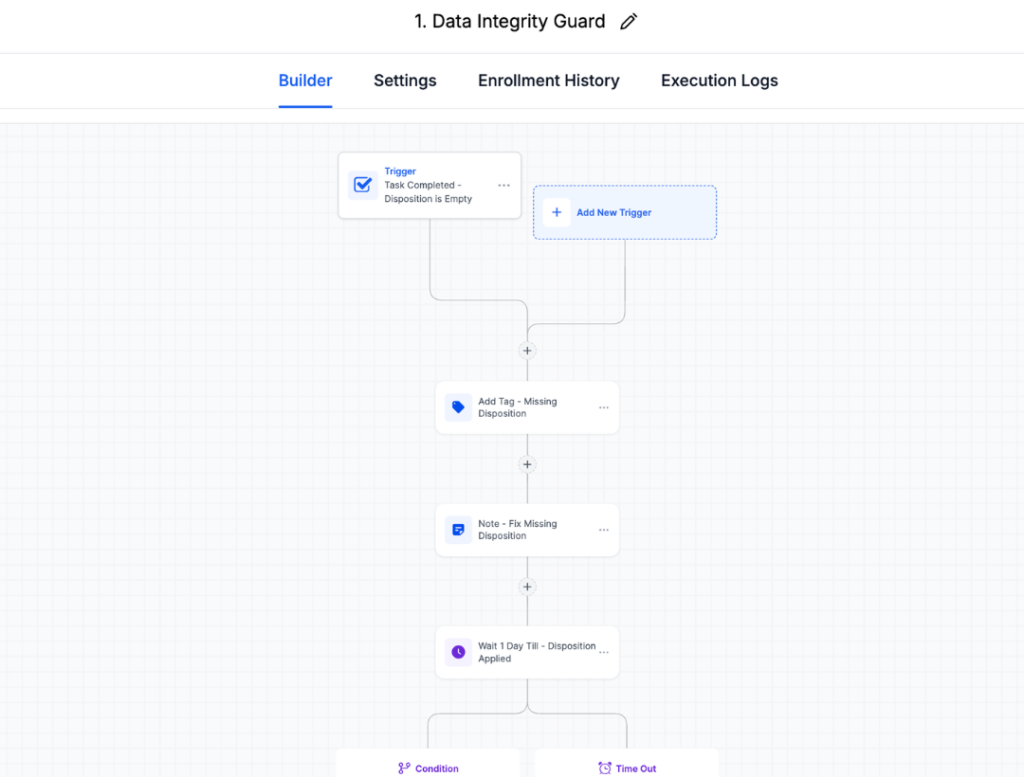
This is one of my favorite additions because it creates a self-correcting accountability loop.
New Workflow Added:
Trigger: Task is completed, AND Disposition field is empty
System Actions:
- Immediately adds tag: ⚠️ Missing Disposition
- Adds internal note: “Please fix missing disposition for this lead”
- Waits 1 day (gives the CSR time to correct it themselves)
- Waits until Monday 9 AM (batches notifications to avoid weekend interruptions)
- Re-checks the Disposition field
- If still missing: Notifies the manager with a list of flagged contacts
Manager Review Process:
Every Monday at 9 AM, the manager receives a notification with all leads that still have missing dispositions. They can then:
- Review the flagged contact
- Check the Weekly Disposition Review smart list
- Follow up with the specific CSR
- Ensure data is corrected
Why This Is Brilliant:
It creates a weekly accountability loop that prevents workflow breakdown. The system doesn’t just fail silently when data is missing — it flags the issue, gives the CSR a chance to fix it themselves, then escalates to management if necessary.
This enforces data discipline without being heavy-handed.
The lesson: Automation should include fail-safes that catch human error and create accountability, not just assume perfection.
Want accountability systems like this built into your workflows? Let’s design fail-safes for your specific business.
Enhancement E: Auto-Cleanup Workflow (System Hygiene)
Trigger: Opportunity updated AND Disposition is now filled in
Action: If the ⚠️ Missing Disposition tag exists, automatically remove it
Purpose:
This is the self-correcting component. Once the CSR or manager fixes the missing disposition, the system automatically cleans up the warning tag. No manual tag removal required.
Why This Matters:
Prevents tag clutter. Keeps reporting clean. Allows the warning tag to be a reliable indicator of current issues rather than a historical record of past problems.
The system self-corrects once the underlying issue is resolved.
The lesson: Build systems that clean up after themselves automatically.
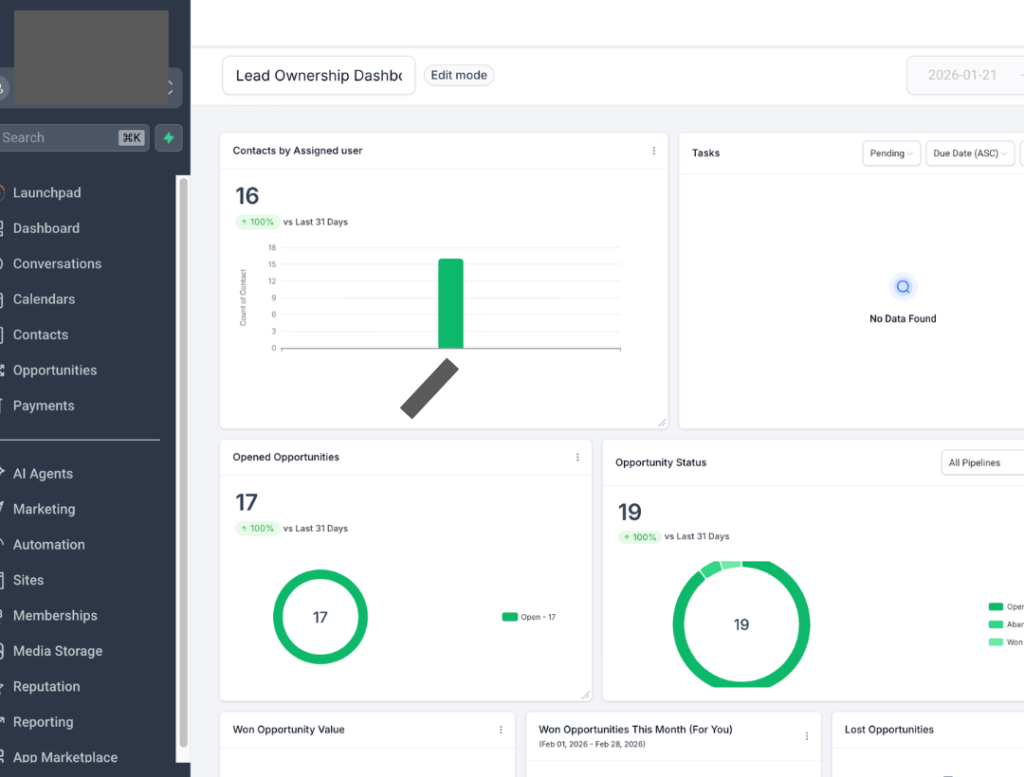
Enhancement F: Lead Ownership Dashboard (Management Visibility)
What Was Added:
A new management dashboard providing real-time visibility into CSR performance and workload distribution.
Dashboard Includes:
- Total Contacts per CSR (shows workload balance)
- Open Tasks (shows current action items per CSR)
- Open Opportunities (shows active leads per CSR)
- Opportunity Status Breakdown (shows pipeline stage distribution)
- Won Opportunity Value (shows revenue generated per CSR)
- Lead Source Performance (shows which sources each CSR is handling)
- Ownership Distribution (identifies if leads are clustering with certain reps)
What This Enables:
Real-time oversight: Managers can see at a glance if one CSR is overloaded while another has capacity
Workload balancing: If leads are distributed unevenly, routing rules can be adjusted
Performance monitoring: Identifies top performers and those who need support
Task execution tracking: Shows if tasks are piling up incomplete
Conversion tracking by rep: Shows which CSRs convert leads most effectively
This dashboard transformed management’s ability to spot problems before they become expensive.
The lesson: Operational systems need management visibility tools, not just CSR automation.
Enhancement G: Client-Initiated Logic Fix (Important Collaboration Moment)
After additional live testing, the client themselves identified a logic gap — and this is worth highlighting because it demonstrates what proper system ownership looks like.
Problem Identified by Client:
When a new appointment was booked through Zenbooker, the system was:
- Creating a new opportunity in Pipeline 2 (correct)
- BUT also triggering the “New Lead” task in Pipeline 1 (incorrect)
- Sometimes, creating duplicate lead intake logic
This caused confusion for CSRs who were getting tasks to “call new lead” for people who already had appointments scheduled.
Client’s Solution:
They added a filter to the Initial Lead Automation workflow:
IF tag = “Lifecycle – Appointment Set” → Do NOT create New Lead task
Result:
- Prevents duplicate task creation
- Stops unnecessary outreach to people who already booked
- Eliminates CSR confusion about which leads to prioritizing
Why This Moment Is Important:
This was a smart safeguard implemented directly by the client during their testing phase. It demonstrates proper system ownership and collaboration.
The best automation systems are those where the client becomes an active partner in refinement — not a passive recipient of a finished product.
The lesson: Build systems that clients can understand and improve themselves. Empower them to make intelligent modifications.
Lessons Learned From Live Deployment: What Theory Doesn’t Teach You
After watching this system operate under real business conditions for several weeks, here are the critical lessons that emerged:
Real-world use always exposes edge cases. You cannot anticipate every scenario in testing. Leads behave unpredictably. CSRs take shortcuts. Systems need to handle the 95th percentile cases, not just the happy path.
Accountability systems must include fail-safes. You can’t just assume people will follow the process perfectly. The system needs to catch mistakes, flag gaps, and create gentle accountability loops that encourage correct behavior.
Ownership logic affects reporting integrity. How you assign and transfer ownership has massive downstream effects on reporting accuracy. This needs to be thought through carefully and tested extensively.
Automation should correct human error — not depend on perfection. The best systems work even when humans take the fastest path, skip steps, or make mistakes. They gently guide correct behavior rather than breaking when imperfection occurs.
Clients who actively test improve system durability. The collaboration with this client — where they tested thoroughly, identified issues, and even implemented fixes themselves — made the final system significantly more robust than it would have been otherwise.
Post-launch refinement is where good becomes great. The initial build was solid, but the enhancements made after live deployment transformed it into something truly bulletproof. This is the work that separates professional systems from amateur ones.
Final System Capabilities (After All Refinements)
After three weeks of initial build and two weeks of live testing and enhancement, here’s what the system now includes:
Core Automation:
- Speed-to-lead enforcement with 5-minute escalation
- 5-day call-based nurture sequence with smart timing
- Two-pipeline architecture preventing chaos
- Appointment automation via Zenbooker webhooks
- No-show recovery via JobNimbus webhooks
- Revenue attribution and job outcome tracking
- 60-day reactivation campaigns for lost leads
- Compliance and DND protection
Data Quality & Accountability:
- Disposition enforcement preventing data gaps
- Missing-data accountability loops with manager escalation
- Self-cleaning tag logic that corrects after fixes
- Weekly disposition review smart list
- Pre-nurture client type tagging
Reporting & Visibility:
- Lead ownership dashboard for management oversight
- CSR performance tracking by source
- Speed-to-lead metrics
- Pipeline conversion analysis
- Revenue attribution by source
- Workload distribution visibility
System Resilience:
- Works correctly even when CSRs take shortcuts
- Automatic nurture activation regardless of disposition path
- Ownership logic that prevents reporting distortion
- Duplicate task prevention for booked appointments
- Fail-safes that catch and correct human error
This isn’t just automation. It’s operational control.
Ready to build something this solid for your business? Schedule your strategy call now.
Results & Strategic Impact: What Changed Operationally
Let me be clear: This case study isn’t about vanity metrics or inflated ROI claims. It’s about operational transformation.
What the roofing company can now do that was impossible before:
See the response time by the CSR. Every manager can instantly see how quickly each CSR is responding to new leads. This creates natural accountability and healthy competition among the team.
Track conversion rate by source. They can definitely answer “Which lead source actually makes us money?” based on closed revenue, not just lead volume or appointment set rate.
Calculate true revenue by channel. With complete attribution from first contact to closed sale, they know the actual ROI of every marketing dollar spent.
Identify no-show trends. They can see which lead sources have higher no-show rates, which days/times have more no-shows, and which CSRs are better at confirming appointments.
Measure reactivation revenue. They can quantify exactly how much revenue is being recovered from leads that would have been completely abandoned under the old system.
Monitor workload distribution. Management can see if leads are being distributed fairly or if certain CSRs are overloaded while others have capacity.
Catch data quality issues before they become problems. The missing disposition fail-safe prevents reporting from being corrupted by incomplete data entry.
Make confident budget decisions. They now have the data to say “We’re increasing Google LSA spend by $2,000/month because it has a 23% close rate and an average job value of $12,500” rather than guessing based on gut feelings.
Why This Matters for U.S. Contractors: Lessons You Can Apply Immediately
If you’re running a roofing, HVAC, remodeling, plumbing, electrical, or any home service company in the United States, here are the critical takeaways from this case study:
Speed-to-lead automation is non-negotiable. The difference between responding in 5 minutes versus 30 minutes can literally mean a 9x difference in conversion rates. If you’re not tracking and enforcing response time, you’re leaving 5-6 figures on the table annually.
Two-pipeline architecture prevents chaos at scale. Cramming everything into one pipeline creates automation conflicts and reporting nightmares. Separate your lead management from your appointment/outcome tracking.
Structured dispositions are the foundation of everything. When your team has clear outcome options after every interaction, your data gets cleaner, your automation gets smarter, and your reporting becomes trustworthy.
Clean pipeline visibility reduces operational stress. When everyone can see where every lead stands in one central location, coordination improves dramatically, and leads stop falling through cracks.
Appointment tracking shouldn’t require double entry. Webhook integrations mean your team never updates two systems. It happens automatically. This saves hours weekly and eliminates sync errors.
No-show recovery is automatic money. Every no-show represents a potential sale that’s already halfway through your pipeline. Automated recovery workflows ensure every single one gets a second chance.
Long-term reactivation creates found money. The leads you spent money to generate don’t become worthless when they say, “not now.” Reactivation campaigns recover revenue that would otherwise be completely lost.
Post-launch refinement is where magic happens. The initial build gets you functional. The enhancements after live testing make you bulletproof. Budget time and resources for this phase.
Accountability systems need fail-safes. Your automation should catch human error, flag issues, and create gentle correction loops, not assume perfection.
Technology should reduce chaos, not create it. The goal isn’t to use more tools or build more complex workflows. The goal is operational clarity and scalability.
Most importantly: Your CSR team shouldn’t need to be automation experts. The system should do the thinking for them. They follow tasks, select outcomes, and let automation handle the rest.
Who This Type of Build Is Perfect For
Based on this project and dozens of similar builds for home service contractors, here’s who benefits most from this level of automation:
You’re generating 30+ leads per month across multiple sources (LSA, Angi, website, referrals, etc.) and struggling to manage them consistently without leads slipping through the cracks.
You have a CSR or inside sales team (even if it’s just 2-3 people) who need clear direction on who to call, when to call them, and what happens next based on each outcome.
You’re using multiple tools (scheduling software, CRM, phone system, messaging platform) that don’t talk to each other, creating manual data entry nightmares and fragmented reporting.
You’re serious about scaling and need systems that can handle 50 leads per month or 500 leads per month without collapsing under their own complexity.
You value data-driven decisions and want to see exactly which marketing channels produce actual closed revenue and profit, not just lead volume or cost-per-lead metrics.
You’re tired of leads disappearing into the void because someone forgot to call back or didn’t schedule a follow-up. You want a system that catches everything automatically.
You’re ready to invest in proper infrastructure rather than continuing to patch broken processes with more manual effort and spreadsheet workarounds.
If three or more of these descriptions match your situation, this type of custom automation build is exactly what you need.
Not sure if this level of automation makes sense for your business yet? Book a free assessment call, and I’ll give you an honest evaluation of whether you’re ready or what automations suit your business the best.
Thinking About Building Something Similar? Let’s Have a Real Conversation.
Here’s the truth that most automation consultants won’t tell you: Not every business needs a $2,500 custom build. Check how different wants determine pricing in one of my previous posts. >>>
If you’re generating 10 leads per month, you probably don’t need this level of automation yet. If you’re a one-person operation handling everything yourself, this might be overkill. If you’re not ready to commit to using the system properly, it won’t matter how well it’s built.
But if you match the profile above, multi-channel lead generation, team-based operations, serious growth goals, and a commitment to data-driven decision making, then this type of system will transform your business.
The reality: Every business is different.
Your lead sources are unique. Your team structure is different. Your current tools aren’t the same. Your specific pain points are particular to your market and operations.
That’s why I don’t offer template solutions or one-size-fits-all packages. Every build starts with understanding your specific situation.
If you’re:
- A roofing company looking to scale operations across multiple markets
- A home service contractor is drowning in manual follow-up and fragmented systems
- A remodeling company with inconsistent lead management and no visibility
- An HVAC business struggling with multi-platform reporting and CSR accountability
- A plumbing or electrical company wanting better speed-to-lead and conversion rates
- An agency building automation systems for contractor clients
And you want a clean, scalable GoHighLevel system that matches how your business actually operates…
Let’s have a conversation.
Book a free 30-minute strategy call, and we’ll discuss:
- Your current lead management challenges and specific pain points.
- Which tools you’re already using and what’s working vs. broken?
- What reporting do you actually need to make better decisions?
- Whether a custom build makes sense for your business right now.
- What would the realistic timeline be?
- What the investment would look like based on your specific needs.
No pressure. No sales pitch. Just a straight conversation about whether this type of system could help your business, and an honest assessment of whether you’re ready for it.
If you’re not ready, I’ll tell you that too. And I’ll tell you what to focus on first before investing in automation.
Or if you prefer, you can email me directly at hello@tumtosiram.com with details about your business, and I’ll get back to you within 24 hours.
Final Thoughts: The Difference Between Features and Operational Clarity
I’ve now built automation systems for dozens of home service contractors across the United States. I’ve seen hundreds more implementations done by other consultants and agencies.
Most of them fail. And they fail for the same reason every time.
They focus on features instead of operational clarity.
Someone gets excited about all the things GoHighLevel can do — SMS campaigns! Email sequences! AI chatbots! Missed call, text back! — and tries to build everything at once.
The result is a complicated mess that nobody understands, nobody uses consistently, and that breaks as soon as real business conditions put pressure on it.
This build succeeded because it focused on the opposite:
Control. Giving management visibility into every lead, every interaction, and every outcome in real-time. No more guessing about what’s happening in the business.
Clean logic. Making the automation easy to understand so when something needs to change (and it always does), it’s not a mystery to figure out how.
Scalability. Building a foundation that can handle 50 leads per month or 500 leads per month without breaking. Growth doesn’t require rebuilding from scratch.
Real-world rep behavior. Designing workflows around how CSRs actually work under pressure, not how we wish they would work in an ideal world.
Cross-platform reality. Accepting that businesses use multiple tools for good reasons and building bridges between them instead of forcing everything into one system.
Post-launch refinement. Treating the initial build as a starting point and improving it through real-world testing, feedback, and iteration.
Accountability systems. Building fail-safes that catch human error and create gentle correction loops rather than assuming perfection.
That’s what makes it powerful. That’s what makes it last. That’s what makes it worth the investment.
If you’re ready to bring that level of clarity and control to your own lead management operations, I’m here to help.
Case Study Update: Live Environment Findings & System Optimization
Once the automation system was pushed into a live environment with real lead flow, several edge cases surfaced that required refinement. This phase was critical in identifying logical gaps that don’t always appear during staging or sandbox testing.
Issues Identified in Live Conditions
The client reported that contacts marked with the following dispositions were still receiving follow-up nurture tasks:
- Marketing / Spam
- Not Interested / Never Submitted
- Max Attempts Reached
- Appointment Booked
Additionally, a more serious issue appeared:
Several contacts did not receive follow-up tasks after Day 1, when they should have progressed through nurture.
Root Cause Analysis
Disposition Logic Not Properly Separated
Inside the workflow’s If/Else condition, multiple dispositions had been combined into a single comma-separated value instead of being evaluated individually.
Because of this:
- The system failed to properly recognize exclusion dispositions such as Appointment Booked, Marketing/Spam, Max Attempts, etc.
- Those contacts unintentionally flowed into the nurture sequence.
Timing Dependency Between Task Completion & Call Outcome
The second issue stemmed from workflow sequencing.
The system originally relied on:
Task Completion → Call Outcome Update → Nurture Trigger
However, in some cases, reps were completing the task before entering the call outcome. Since the trigger evaluated the contact state at the moment of task completion (when no outcome was present yet), the workflow failed to fire for certain contacts.
This created inconsistent follow-up behavior.
How It Was Fixed
Disposition Logic Rebuilt
- Each disposition is now evaluated as an individual condition inside the If/Else logic.
- Excluded outcomes (Marketing/Spam, Appointment Booked, Max Attempts, etc.) are now properly recognized and blocked from nurture.
- This prevents incorrect task generation for closed or invalid leads.
Trigger Architecture Updated
- A new trigger was implemented based on Contact Updated (Call Outcome field) rather than relying solely on task completion timing in the workflow 2
- When the Call Outcome custom field is updated, the workflow now:
- Checks whether the contact is already in nurture.
- If not, routes them into the appropriate nurture sequence based on outcome.
- Checks whether the contact is already in nurture.
This eliminates timing race conditions and removes dependency on the order in which reps complete tasks and apply outcomes.
Result
The system now:
- Correctly suppresses follow-ups for closed or excluded dispositions.
- Reliably progresses valid leads through nurture.
- Prevents duplicate entries.
- Handles real-world rep behavior without relying on perfect click order.
- Maintains reporting integrity at the opportunity level.
Key Takeaway
Live deployment revealed logic gaps that only appear under real operational pressure. Running the automation in a live environment was essential to identifying and resolving these loopholes.
The final architecture is now more resilient, state-driven, and less dependent on timing-based triggers, making it significantly more stable and scalable for ongoing growth.

One Comment